AutoResearch by Andrej Karpathy: A Practical, Beginner-Friendly Deep Dive
A detailed guide to understanding, running, and extending karpathy/autoresearch with architecture diagrams, code walkthroughs, references, and implementation tips.

If you are curious about automating serious research work with LLMs, karpathy/autoresearch is one of the most interesting repositories to study.
This post explains the project in plain English, then goes deep into architecture, implementation patterns, prompts, evaluation, and extension ideas.
1) What is autoresearch in one sentence?
autoresearch is an open-source attempt to build an AI system that can:
- take a research question,
- search and collect sources,
- read and compare them,
- write a structured summary with references.
In other words, it tries to move from “chat-style answer” to “workflow-style research output.”
2) Why this repo matters
Most AI demos stop at generation. Real research work needs much more:
- source discovery,
- ranking and filtering,
- citation handling,
- conflict detection,
- and reproducible outputs.
autoresearch is valuable because it treats research as a pipeline rather than a single prompt.
3) Mental model: the pipeline
You can think about the system as six stages:
| Stage | Goal | Typical Failure Mode | Practical Fix |
|---|---|---|---|
| Scope | Make the question specific | Too broad topic | Force explicit constraints (time, domain, format) |
| Search | Retrieve candidate sources | Weak queries | Query rewriting + multi-source retrieval |
| Rank | Keep high-signal material | Spam/low quality docs | Dedup + quality scoring |
| Extract | Pull key facts and claims | Hallucinated extraction | Require quote + source pair |
| Synthesize | Combine evidence | Overconfident summary | Add disagreement section |
| Report | Deliver useful output | No traceability | Inline citations + bibliography |
4) Typical architecture (conceptual)
Below is a conceptual architecture most people implement around autoresearch patterns:
User Query
   |
   v
Planner Agent
   |
   +--> Search Tool(s): arXiv / Semantic Scholar / web / internal docs
   |
   +--> Reader Agent: chunking, extraction, claim detection
   |
   +--> Synthesizer Agent: compare findings, detect conflicts
   |
   +--> Writer Agent: produce final report with references
   |
   v
Artifacts: markdown report + citation list + logs
A strong implementation keeps each stage separate so you can debug quality problems quickly.
5) Quick start pattern (example)
The exact commands can evolve over time. Always check the latest README and
pyproject.tomlin the repository.
# 1) Clone
git clone https://github.com/karpathy/autoresearch.git
cd autoresearch

# 2) Create venv
python -m venv .venv
source .venv/bin/activate

# 3) Install dependencies
pip install -U pip
pip install -e .

# 4) Configure API keys (example)
export OPENAI_API_KEY="..."

# 5) Run a research task (example)
python -m autoresearch "What are the best practices for long-context evaluation in LLM systems?"
6) Core implementation ideas (easy explanation)
A) Query planning before retrieval
Naive approach:
- Ask one generic question,
- get generic documents,
- produce shallow summary.
Better approach:
- Break the question into sub-questions,
- generate multiple retrieval queries,
- merge and deduplicate results.
Example pseudocode:
def plan_queries(user_question: str) -> list[str]:
    prompt = f"""
    Break this question into 5 focused research sub-queries:
    {user_question}
    """
    return llm_generate_list(prompt)
B) Evidence-first extraction
Instead of “summarize this paper”, ask for:
- claim,
- supporting quote,
- citation metadata,
- confidence score.
@dataclass
class Evidence:
    claim: str
    quote: str
    source_title: str
    source_url: str
    confidence: float
This reduces unsupported statements in final reports.
C) Conflict-aware synthesis
A good research system does not only aggregate agreement. It should also say:
- where studies disagree,
- why they might disagree (dataset, method, assumptions),
- what uncertainty remains.
7) How to evaluate quality (important)
Use a simple scorecard per output:
| Metric | What to Check | Score Range |
|---|---|---|
| Coverage | Did it answer all sub-questions? | 1-5 |
| Citation Accuracy | Are claims traceable to real sources? | 1-5 |
| Faithfulness | Is summary consistent with quoted evidence? | 1-5 |
| Practical Utility | Can a teammate act on this report? | 1-5 |
| Calibration | Are uncertainties clearly stated? | 1-5 |
A lightweight evaluator can be scripted as:
def evaluate_report(report: str, evidence_items: list[Evidence]) -> dict:
    return {
        "coverage": judge_coverage(report),
        "citation_accuracy": judge_citations(report, evidence_items),
        "faithfulness": judge_faithfulness(report, evidence_items),
        "utility": judge_utility(report),
        "calibration": judge_uncertainty(report),
    }
8) Time/effort impact (illustrative chart)
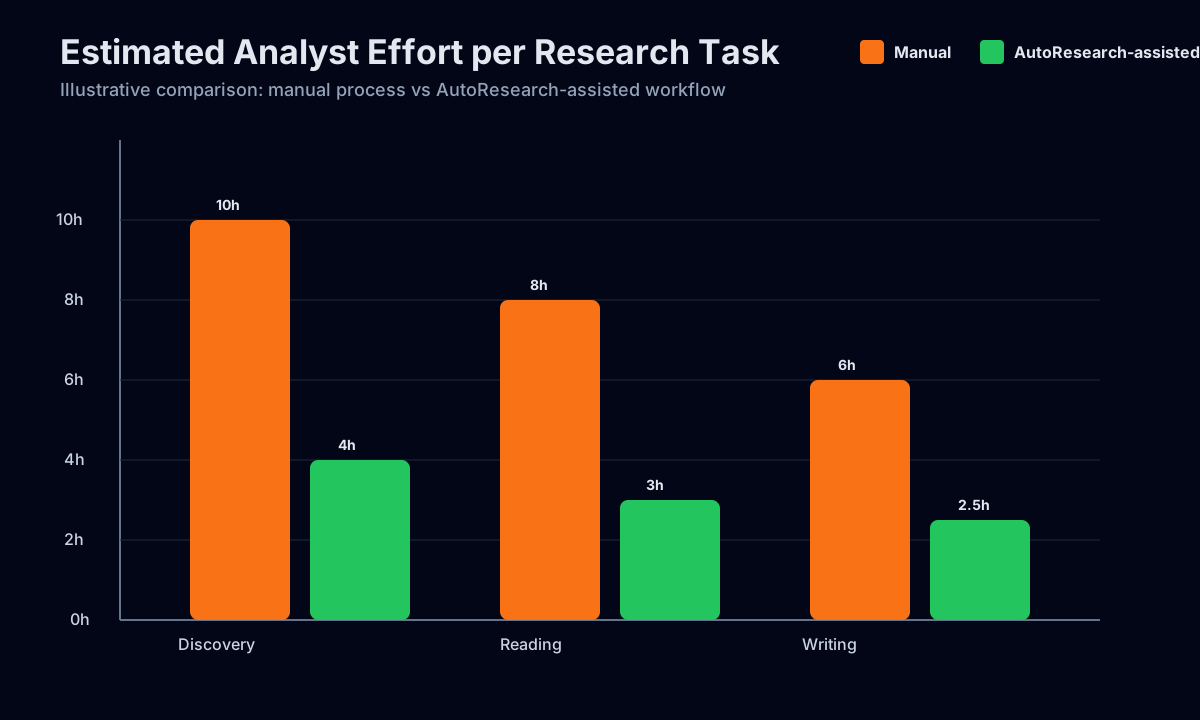
The chart is not a benchmark from the repository; it is an explanatory model showing why pipeline automation helps:
- less manual search,
- less repetitive note-taking,
- faster first draft creation.
9) Practical extension ideas
If you want to build on top of autoresearch, these are high-impact upgrades:
- Source adapters
- Add connectors for your internal wiki, Notion, Confluence, or paper databases.
- Reranking model
- Improve relevance with embedding-based reranking before reading.
- Citation validator
- Reject claims with missing/weak evidence.
- Human review UI
- Add “accept / edit / reject” controls for each extracted claim.
- Regression test set
- Keep a fixed list of research questions and monitor quality drift over time.
10) Common pitfalls and how to avoid them
Pitfall 1: Treating all sources equally
Not all documents are high quality.
Fix: add source trust scoring (venue, citation count, recency, reproducibility signals).
Pitfall 2: Overconfident writing
LLMs can produce polished but weakly grounded prose.
Fix: force evidence blocks and uncertainty labels.
Pitfall 3: No reproducibility
If prompts/tools change silently, output changes become hard to explain.
Fix: log prompts, model version, retrieval results, and run IDs.
11) Minimal reference implementation pattern (pseudo-project)
autoresearch_app/
  run.py
  config.py
  retrieval/
    arxiv.py
    semantic_scholar.py
    web.py
  pipeline/
    planner.py
    ranker.py
    extractor.py
    synthesizer.py
    writer.py
  evaluation/
    scorecard.py
  outputs/
    report.md
    evidence.json
    run_log.json
This folder design keeps experimentation manageable and testable.
12) References (start here)
Primary:
karpathy/autoresearchGitHub repository: https://github.com/karpathy/autoresearch
Useful supporting references:
- arXiv API docs: https://info.arxiv.org/help/api/index.html
- Semantic Scholar API docs: https://api.semanticscholar.org/api-docs/
- OpenAlex API docs: https://docs.openalex.org/
- “Retrieval-Augmented Generation for Knowledge-Intensive NLP Tasks” (Lewis et al.): https://arxiv.org/abs/2005.11401
- “Lost in the Middle” (long-context behavior): https://arxiv.org/abs/2307.03172
- “Chain-of-Thought Prompting Elicits Reasoning in LLMs”: https://arxiv.org/abs/2201.11903
13) Final takeaway
If you are learning AI engineering, autoresearch is a strong case study because it teaches an important lesson:
Useful AI products are systems, not prompts.
When you design for retrieval quality, evidence traceability, and evaluation from day one, your results become far more reliable and team-ready.