Open LLM GPU Fundamentals Every AI/ML Engineer Should Understand
A practical deep-dive into GPU architecture, memory behavior, inference scheduling, and optimization techniques for serving Open LLMs effectively.
If you work with Open LLMs (Llama, Qwen, Mistral, Gemma, etc.), understanding GPU fundamentals is one of the highest-leverage skills you can build.
Many teams focus only on model quality, but production success is usually decided by:
- latency (time to first token, tokens/sec),
- cost per 1K/1M tokens,
- stability under concurrent traffic,
- memory behavior (especially KV cache growth).
This guide is designed to make GPU + Open LLM concepts intuitive and practical.
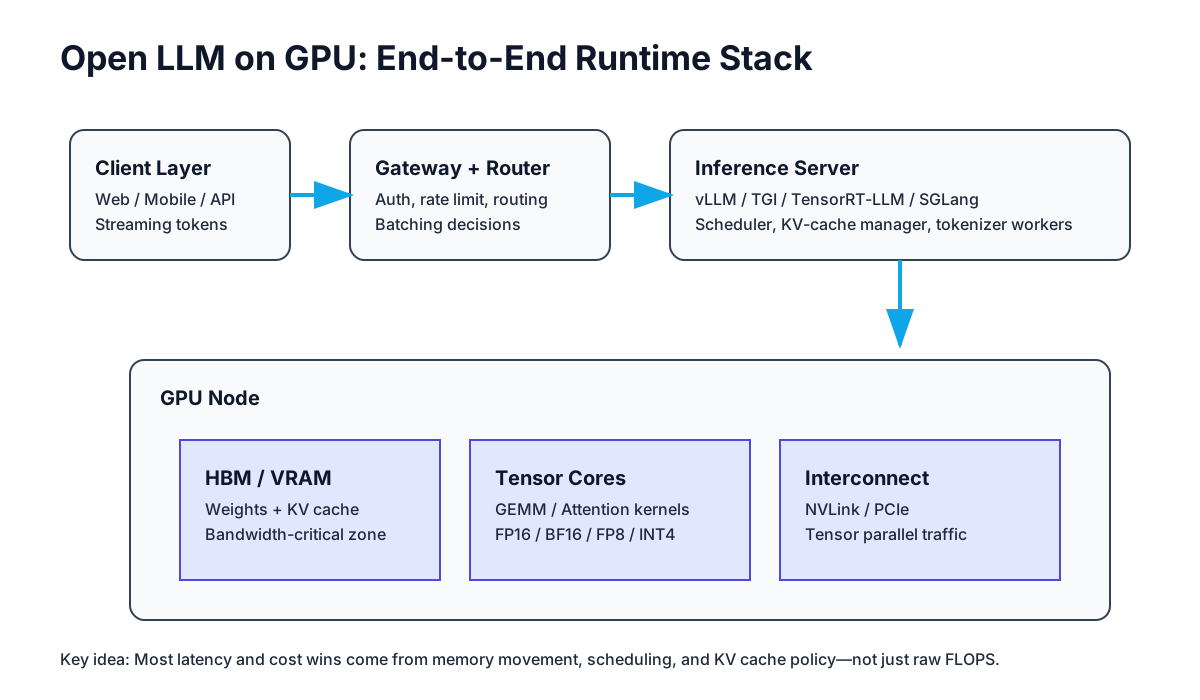
1) Big Picture: Why GPUs Matter for Open LLMs
At inference time, an LLM repeatedly executes very large matrix multiplications and attention operations. GPUs are optimized for this style of massively parallel math.
But for LLM serving, raw compute is not the full story:
- You must move huge amounts of data (weights, activations, KV cache) in and out of memory.
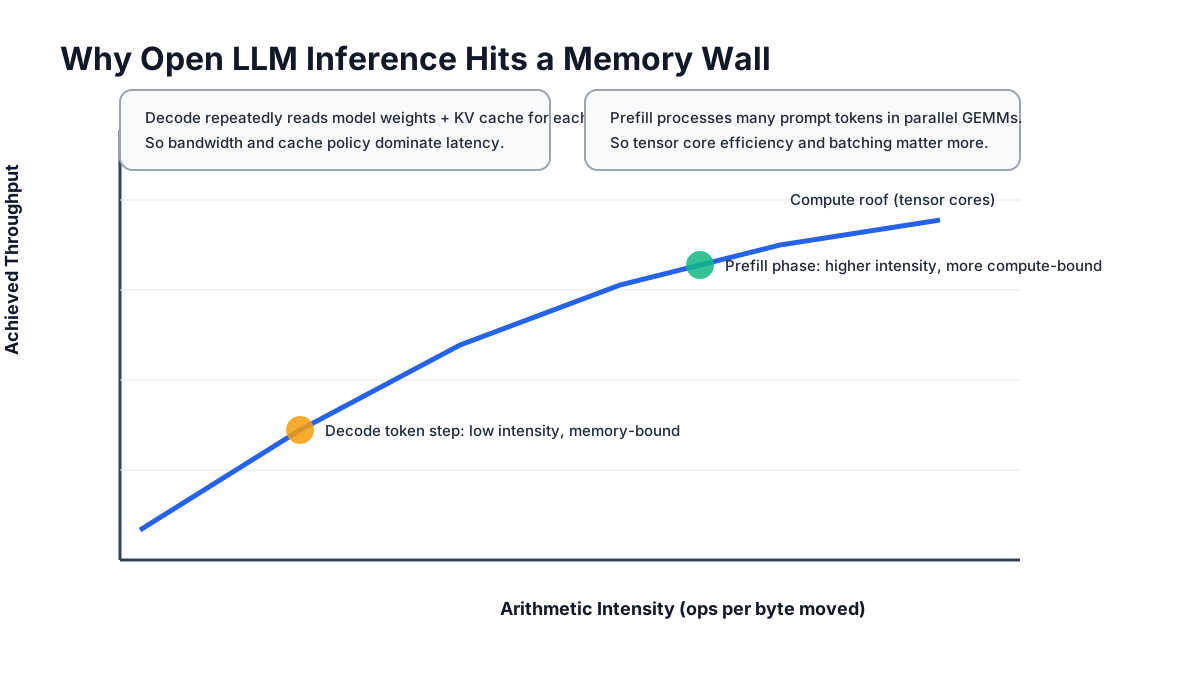
- Decode phase (token-by-token generation) is often memory-bandwidth bound.
- A good scheduler (continuous batching, fair queueing, cache reuse) can improve throughput more than changing model weights.
In short:
- Training bottleneck is often compute + interconnect,
- Inference bottleneck is often memory movement + scheduling.
2) Core GPU Concepts You Should Know (No Hardware PhD Required)
2.1 VRAM (HBM) Capacity
VRAM stores:
- model weights,
- runtime buffers,
- KV cache for active requests,
- temporary tensors for kernels.
If VRAM is insufficient, you may offload to CPU memory, but latency jumps significantly.
A practical memory rule:
- model memory ≈ parameter_count × bytes_per_parameter,
- plus non-trivial overhead for runtime buffers + KV cache.
Example intuition:
- 7B model in FP16/BF16: roughly ~14 GB for weights only,
- same model in 4-bit quantization: often around ~4–6 GB for weights (implementation-dependent).
2.2 Memory Bandwidth
Bandwidth (GB/s or TB/s) is often more important than TOPS for decode performance.
Why? During decode, each new token may require reading a lot of weights and cache state. If memory cannot feed tensor cores fast enough, compute units sit idle.
2.3 Tensor Cores and Numeric Precision
Tensor cores accelerate matrix math. Their efficiency depends heavily on datatype:
- FP16 / BF16: strong quality + speed baseline,
- FP8: higher speed and lower memory, but requires careful calibration/tooling,
- INT8 / INT4: great memory savings and potentially much better throughput, at possible quality trade-offs.
Rule of thumb: choose the lowest precision that preserves your task quality.
2.4 Interconnect (PCIe vs NVLink)
When a model spans multiple GPUs (tensor parallel/pipeline parallel), GPUs exchange activations and partial results.
- PCIe is common but lower-bandwidth,
- NVLink/NVSwitch provides much faster GPU-to-GPU communication.
As model parallelism increases, interconnect quality becomes critical.
3) Open LLM Inference Pipeline: Prefill vs Decode
Open LLM serving has two distinct phases:
- Prefill phase: process input prompt tokens in parallel.
- Decode phase: generate next tokens one-by-one autoregressively.
These phases stress hardware differently.
Prefill characteristics
- high parallelism,
- larger matrix operations,
- more compute-heavy,
- batching is usually very effective.
Decode characteristics
- sequential dependency (next token depends on previous),
- lower arithmetic intensity,
- often memory-bound,
- KV cache efficiency becomes dominant.
This is why teams that only benchmark “tokens/sec” without splitting prefill/decode often make wrong architecture decisions.
4) KV Cache: The Most Important Runtime Concept
Each active generation request stores attention key/value tensors for past tokens. This is KV cache.
Why KV cache matters
- It avoids recomputing entire prompt history every token.
- It can consume massive VRAM at scale.
- It directly impacts throughput and maximum concurrency.
Practical implications
- Long contexts increase KV memory linearly with token count.
- High concurrency multiplies total KV usage.
- Poor cache policy causes OOM or aggressive eviction, hurting latency.
Engineering levers:
- cap max context per tier/user,
- enable paged attention / efficient cache paging,
- tune max concurrent sequences,
- consider prefix caching when prompts share common headers.
5) Quantization: Performance Win with Quality Guardrails
Quantization reduces weight precision to cut memory and improve throughput.
Common choices:
- INT8: easier quality retention, moderate gains,
- 4-bit (AWQ/GPTQ/other): stronger memory savings and better density,
- mixed precision variants depending on framework.
What to evaluate before rollout:
- Task-level accuracy (classification, extraction, coding pass rate, etc.),
- Hallucination or refusal drift,
- Latency distribution (P50/P95/P99),
- Throughput under realistic prompt length mix.
Do not ship quantization changes without a regression suite.
6) Batching and Scheduling: Where Real Throughput Comes From
Naive static batching often underutilizes GPU in production traffic. Modern Open LLM engines use:
- continuous batching (add new requests as slots free up),
- token-level schedulers,
- fairness policies to avoid starvation by long generations.
Why this matters:
- better GPU occupancy,
- more stable latency under bursty load,
- higher cost efficiency.
Important trade-off:
- maximizing throughput can hurt single-user latency.
- choose policy based on product goal (chat UX vs offline bulk generation).
7) Parallelism Strategies (Single GPU → Multi-GPU)
7.1 Data Parallel
- replicate full model across GPUs,
- each GPU serves different requests.
Best when model fits on one GPU and you need horizontal scale.
7.2 Tensor Parallel
- split tensors/layers across GPUs,
- each token step requires cross-GPU communication.
Needed for larger models, but interconnect cost grows.
7.3 Pipeline Parallel
- split layers into stages across GPUs,
- micro-batches flow stage by stage.
Useful for very large models; adds pipeline scheduling complexity.
7.4 Expert Parallel (for MoE models)
- route tokens to selected experts,
- communication pattern depends on expert placement.
Can be efficient, but routing/load balance is a major challenge.
8) Metrics That Actually Matter in Open LLM Serving
Track these at minimum:
- TTFT (Time To First Token),
- TPOT (Time Per Output Token),
- output tokens/sec per GPU,
- request throughput at SLO (not peak synthetic only),
- VRAM usage split: weights vs KV cache vs buffers,
- queue wait time,
- failure/eviction/OOM rates.
For product teams, tie system metrics to business KPIs:
- cost per successful response,
- user-visible latency percentile,
- quality score under load.
9) Practical Optimization Playbook (Step-by-Step)
If you are operating an Open LLM service, this sequence works well:
- Baseline correctly
- Measure TTFT, TPOT, P95 latency, GPU memory, and queueing on realistic traffic traces.
- Fix obvious memory waste
- Right-size max context and generation caps.
- Enable better runtime engine features
- Continuous batching, paged KV cache, prefix cache.
- Apply quantization carefully
- Start INT8 or safe 4-bit variants; run full quality regression.
- Tune scheduler policy
- Separate latency-sensitive and batch workloads.
- Scale architecture
- If model fits: data parallel first.
- If model does not fit: tensor/pipeline + faster interconnect.
- Add guardrails
- SLO-based autoscaling, admission control, and fallback model routing.
10) Frequent Mistakes and How to Avoid Them
Mistake A: Buying GPU by VRAM only
You also need bandwidth, tensor performance for your precision, and interconnect quality.
Mistake B: Benchmarking with one prompt length
Real traffic has a distribution. Always benchmark short/medium/long prompts and mixed concurrency.
Mistake C: Ignoring queueing behavior
Even fast kernels cannot save bad queue policy during traffic spikes.
Mistake D: Quantizing without task regression
“Looks okay on a few prompts” is not enough for production.
Mistake E: No KV cache budget policy
Without per-request/token limits, one heavy workload can destabilize the cluster.
11) Recommended Mental Model
When debugging Open LLM GPU performance, ask in this order:
- Is the problem compute-bound or memory-bound?
- Is latency spent in prefill, decode, or queueing?
- Is KV cache pressure driving instability?
- Is scheduler policy aligned with product SLO?
- Are quality and cost still acceptable after optimizations?
This mental model helps you avoid random tuning and focus on root cause.
12) Final Takeaway
To truly understand Open LLM systems, do not separate “model knowledge” from “GPU runtime knowledge.”
High-performing teams combine:
- model understanding,
- hardware-aware serving,
- disciplined measurement,
- product-aligned optimization.
If you master GPU memory behavior, KV cache dynamics, and scheduler trade-offs, you will make consistently better Open LLM decisions than teams that only chase larger models.