Open LLMs and GPUs: A Practical Map for Memory, Training, and Serving Costs
An engineer-friendly guide to understanding how open LLM model size maps to GPU memory, hardware choices, and cost trade-offs for both training and inference.
If you are planning to use open LLMs in production, the most important practical question is not just “Which model is best?” but:
Which model fits on which GPU, at what precision, with what latency and cost?
This guide gives you a system-level mental model with concrete examples, formulas, code, and diagrams.
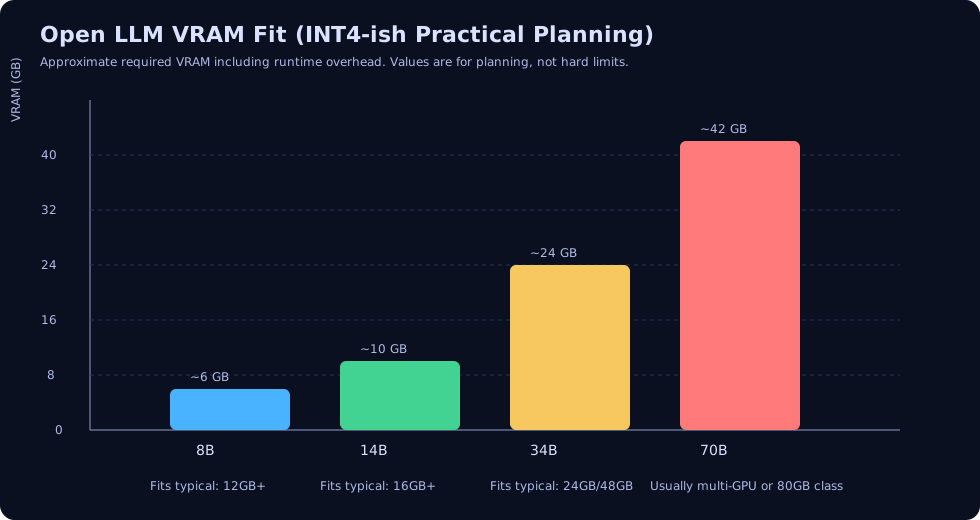
1) The Fast Mental Model
When you choose an open model, think in this order:
- Task target: chat quality, coding quality, multilingual, long context, etc.
- Latency target: e.g., p95 < 1.5s for chat, < 300ms/token for streaming.
- Concurrency target: how many simultaneous users you need.
- Budget target: both upfront and monthly.
- Deployment constraint: single consumer GPU vs multi-GPU server cluster.
Then map those targets to model size and precision.
2) Core Formulas You Should Remember
2.1 Model weight memory
For a model with parameter count P:
Weight Memory (bytes) = P × bytes_per_parameter
Common precision assumptions:
- FP16/BF16: 2 bytes/param
- INT8: 1 byte/param
- INT4: 0.5 byte/param (plus quantization metadata overhead)
So a 7B model at FP16 is approximately:
7 × 10^9 × 2 ≈ 14 GB
2.2 Training memory (rough rule)
For full fine-tuning with Adam, practical memory is often approximated as:
Training VRAM ≈ 12 to 16 × FP16 weight memory
For LoRA/QLoRA, trainable state is much smaller, so single-GPU fine-tuning becomes feasible for 7B/13B-class models.
2.3 Serving throughput intuition
A simple throughput approximation (for decoder-only models):
Tokens/sec ∝ (GPU_memory_bandwidth × utilization) / bytes_moved_per_generated_token
This is why quantization and KV-cache optimizations matter as much as raw TFLOPS for inference.
3) Open Model Families and Typical Device Fit
Numbers below are practical planning ranges, not absolute limits. Runtime engine, sequence length, batching, and tensor parallelism can shift them significantly.
| Model family (example) | Params | FP16 weight mem (approx) | INT8 (approx) | INT4 (approx) | Typical device fit |
|---|---|---|---|---|---|
| Llama 3.2 1B | 1B | ~2 GB | ~1 GB | ~0.6 GB | RTX 3060+ / Apple M-series / small edge GPU |
| Llama 3.1 8B / Mistral 7B class | 7B–8B | ~14–16 GB | ~7–8 GB | ~4–5 GB | RTX 4090 (24 GB), A10 (24 GB), L4 (24 GB) |
| Llama 3.1 70B class | ~70B | ~140 GB | ~70 GB | ~35–45 GB | Multi-GPU (2–8x A100/H100), high-end server only |
| Mixtral 8x7B (MoE, sparse active params) | 46.7B total | heavy | moderate with quantization | moderate | Usually multi-GPU for high-throughput serving |
| Qwen2.5 14B class | ~14B | ~28 GB | ~14 GB | ~8–10 GB | 1x 48 GB GPU or 2x 24 GB GPUs |
4) GPU Tiers and What They Are Good For
| GPU tier | Example hardware | Practical open-LLM usage |
|---|---|---|
| Consumer desktop | RTX 3060 12GB, RTX 4090 24GB | Local prototyping, low-concurrency inference, small LoRA experiments |
| Prosumer/workstation | RTX 6000 Ada 48GB | 13B–34B-class inference, stronger batch throughput |
| Cloud inference GPU | NVIDIA L4 24GB, A10G 24GB | Cost-efficient API serving for 7B–14B models |
| Cloud training GPU | A100 40/80GB, H100 80GB | Full finetuning, large context, high throughput serving |
| Multi-GPU nodes | 4x/8x A100 or H100 | 70B+ models, distributed training, high-QPS enterprise serving |
5) Training vs Serving Cost Structure
flowchart TD
  A[Choose model + quality target] --> B{Workload type}
  B -->|Training| C[Compute hours + optimizer state + checkpoints]
  B -->|Serving| D[GPU uptime + KV cache + autoscaling]
  C --> E[One-time or periodic cost spikes]
  D --> F[Continuous monthly run-rate]
  E --> G[Total cost of ownership]
  F --> G
Training cost drivers
- GPU-hours (largest component).
- Token volume and sequence length.
- Fine-tuning method (full FT vs LoRA/QLoRA).
- Checkpoint frequency and storage.
Serving cost drivers
- Required p95 latency.
- Peak concurrency and autoscaling buffer.
- Context window size (KV cache memory pressure).
- Model precision and runtime (vLLM, TensorRT-LLM, TGI, etc.).
pie title Typical monthly serving cost split (example, API product)
  "GPU compute" : 68
  "Engineering + ops" : 15
  "Storage + logging" : 7
  "Networking" : 5
  "Monitoring + tooling" : 5
6) Practical Sizing Examples
Example A: Startup chatbot (good quality, moderate traffic)
- Model: 8B instruct model (INT4/INT8)
- Traffic: 20 concurrent users, short-medium prompts
- Target: p95 first token < 1.5s
- Hardware option: 1x L4 or 1x A10G
Why this works:
- 8B INT4 often fits comfortably in 24GB VRAM with runtime overhead.
- Good price/performance for initial production.
Example B: Enterprise coding assistant (higher quality)
- Model: 34B or 70B class
- Traffic: high concurrency, longer outputs
- Target: higher answer quality + reliability
- Hardware option: multi-GPU A100/H100 nodes
Why this works:
- Larger models improve reasoning/coding quality in many workloads.
- But memory and latency force tensor parallel + optimized serving stack.
7) Quick Estimator Code (Memory and Monthly Serving Cost)
from dataclasses import dataclass

@dataclass
class LLMPlan:
  params_b: float                 # model params in billions
  precision_bytes: float          # 2.0 fp16, 1.0 int8, 0.5 int4
  overhead_factor: float = 1.25   # runtime + kv/cache + fragmentation estimate

  def weight_memory_gb(self) -> float:
    return self.params_b * self.precision_bytes

  def required_vram_gb(self) -> float:
    return self.weight_memory_gb() * self.overhead_factor


def monthly_gpu_cost(hourly_rate: float, gpu_count: int = 1, utilization: float = 0.65) -> float:
  # utilization here means average active fraction of provisioned capacity
  monthly_hours = 24 * 30
  return hourly_rate * gpu_count * monthly_hours / max(utilization, 1e-6)


# Example: 8B model at int4 on one $0.80/hr GPU
plan = LLMPlan(params_b=8.0, precision_bytes=0.5, overhead_factor=1.3)
print('Estimated VRAM needed (GB):', round(plan.required_vram_gb(), 2))
print('Estimated monthly GPU cost ($):', round(monthly_gpu_cost(0.80), 2))
8) Decision Matrix: Which Setup Should You Start With?
| Situation | Recommended model range | Recommended hardware | Notes |
|---|---|---|---|
| Solo developer / local R&D | 3B–8B | 12–24GB consumer GPU | Prefer INT4 + fast inference engine |
| MVP API (small production) | 7B–14B | 1x L4/A10G/4090 | Great cost-quality starting point |
| Mid-scale SaaS assistant | 14B–34B | 1–4 enterprise GPUs | Add batching, autoscaling, prompt caching |
| High-quality enterprise assistant | 34B–70B+ | Multi-GPU cluster | Stronger eval + safety + observability required |
9) Common Mistakes (and How to Avoid Them)
- Choosing model first, constraints later
- Start from SLA, concurrency, and budget.
- Ignoring KV cache growth with long context
- Test real prompt lengths early.
- Using FP16 everywhere by default
- Benchmark INT8/INT4 quality impact before deciding.
- No evaluation harness before scaling
- Establish quality + latency + cost dashboards first.
- Underestimating serving complexity
- Runtime choice and batching policy often dominate cost.
10) Final Takeaway
A practical rule that works for many teams:
- Start with 7B–14B models.
- Serve with INT4/INT8 on 24GB-class GPUs.
- Add LoRA/QLoRA for domain adaptation.
- Move to 34B/70B only when your quality gap is measured and meaningful.
If you understand the relationship between model size ↔ precision ↔ memory ↔ latency ↔ cost, you can design an OpenLLM stack that is both technically strong and financially sustainable.